Skills
Copyright © 2026GotoAI Inc.Based on the goose project
A skill is what this desk knows how to do — its working procedure. It is the equivalent of the manual kept at a staffed counter.
The division of labour with MCP Servers is that an MCP server is a tool and a skill is a procedure. The route that fetches a report is the tool; what is written about how to read it, what to compare it with and how to write it up is the procedure.
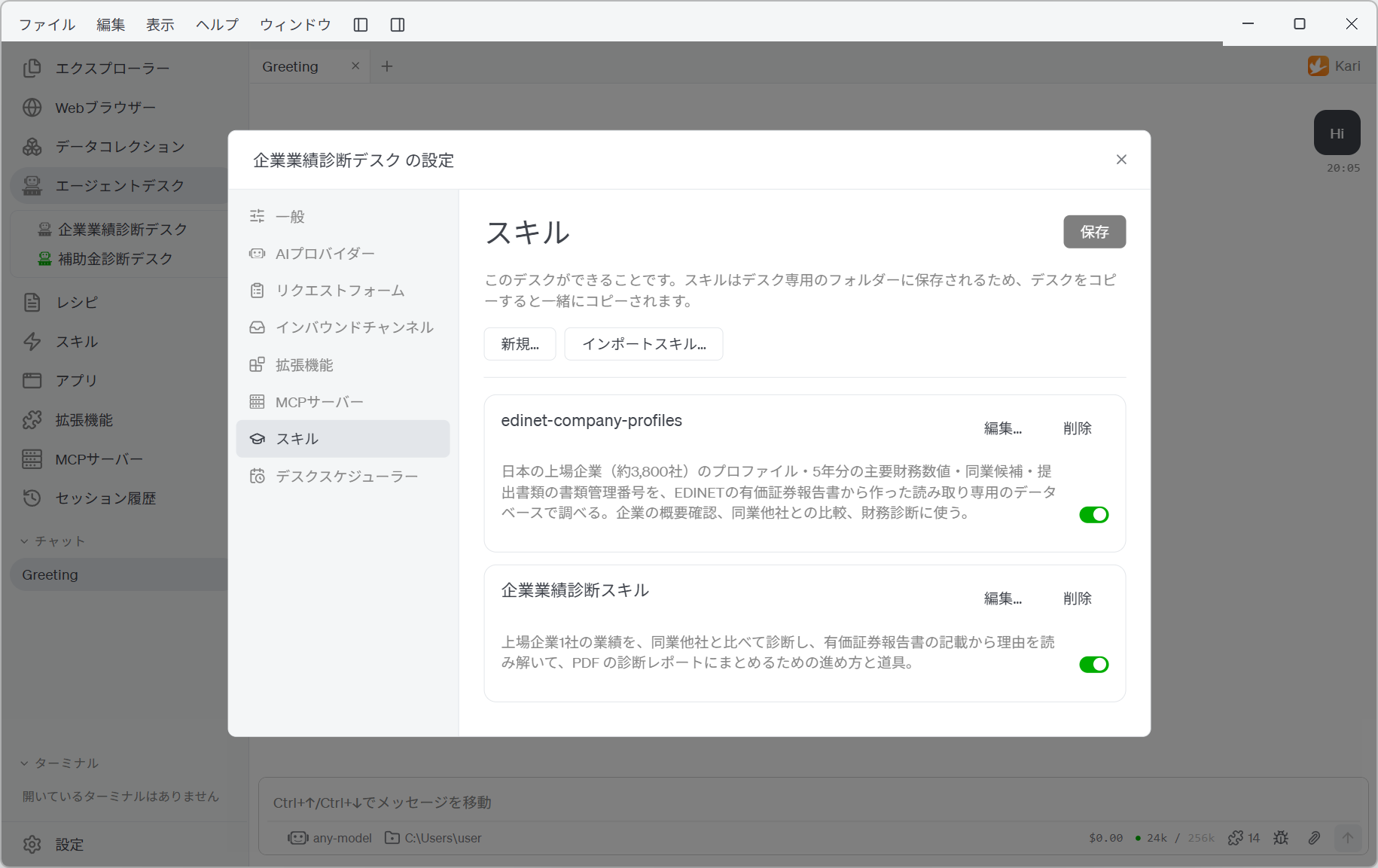
Skills live in a folder of the desk's own
Skills are kept under skills/ in the desk's home directory, one folder per skill. They are separate from Kari's own skills and from the skills of other desks.
That means copying a desk takes its skills with it, and exporting the settings includes each skill folder with the files inside it.
What SKILL.md must contain
Each skill folder needs one SKILL.md. It holds front matter between --- lines, and below that what the skill tells the agent.
---
name: 業績診断
description: 上場企業の業績を同業他社と比較して診断するときに使う。比較指標の選び方と、レポートの構成を定める。
---

## 手順

1. 企業プロファイルから、診断対象の会社と比較対象の候補を取得する。
2. ...
| Item | Rule |
|---|---|
name | Required. It becomes the skill's folder name, so it cannot contain / or \, or start or end with a period. Up to 64 characters. No two skills on a desk may share one |
description | Shown in the skill list. It can be left out, but writing one is strongly recommended (see below) |
| Body | Required. Below the front matter, write what the skill tells the agent |
The Desk Overall Instructions are read on every request, whereas a skill is read when it is needed. What the agent goes on to make that decision is the description.
Rather than "the procedure for performance diagnosis", write something that shows the situation: "use this when diagnosing a listed company's performance against its industry peers". It is not a field for summarising the procedure. It is the field that says when to open it.
Creating, importing and editing skills
The Skills topic in the settings window lists the desk's skills.
| Action | What it does |
|---|---|
| New… | Names a skill and creates a SKILL.md with front matter |
| Import Skill… | Takes an existing skill folder. A folder whose SKILL.md cannot be read as a skill is refused |
| Edit… | Opens the editor: the folder tree on the left, the contents of the selected file on the right |
| Delete | Deletes the skill and its folder. This cannot be undone |
| Switch | Enables or disables each skill. Turn off the ones you are not using |
The switches in the skill list are written when you press Save, like every other setting. Creating, importing and deleting a skill, on the other hand, take effect the moment you ask for them: those are file operations, not settings.
Optional files alongside a skill
Besides SKILL.md, a skill folder can hold the files the procedure refers to.
- Scripts: a Python script, say, for a part of the work that should run the same way every time.
- Templates: a
.pptxor.xlsxthe deliverable is built from. - Reference data: a table or database the procedure consults.
These are referred to from the body of SKILL.md. In the editor's tree, right-click to add, replace or delete a file. Importing a file that is already there asks whether to replace it. (SKILL.md itself is never replaced by an import — edit it instead.)
Writing a procedure
A desk's skill is the place to write what to look at, in what order to go, and what the deliverable must contain.
| Worth writing | Better left out |
|---|---|
| The order of the work, and what to consult at each stage | Judgements about an individual case (those change with each request) |
| The structure of the deliverable (headings, what to include, how to cite sources) | Which AI provider or model to use (that is a setting) |
| What to verify (where a figure came from, whether statements agree) | Where the deliverable goes (that is a setting — see How deliverables are sent) |
| How to recognise a request the desk cannot handle, and how to answer it | Passwords and API keys (credentials are referred to by name) |
The reason long procedures go into a skill rather than the Desk Overall Instructions is to avoid making the agent read, every time, text it does not need every time. If a desk takes on more than one kind of work, give each kind its own skill.