Retrieve real estate price data for Tokyo's 23 special wards from MLIT's Real Estate Information Library
Copyright © 2026GotoAI Inc.Based on the goose project
The steps on this page were verified in the following environment.
- Kari: version 0.7.3, Windows
- AI provider: OpenAI ChatGPT subscription
- Model: GPT-6.1 Sol High
Preparing the work
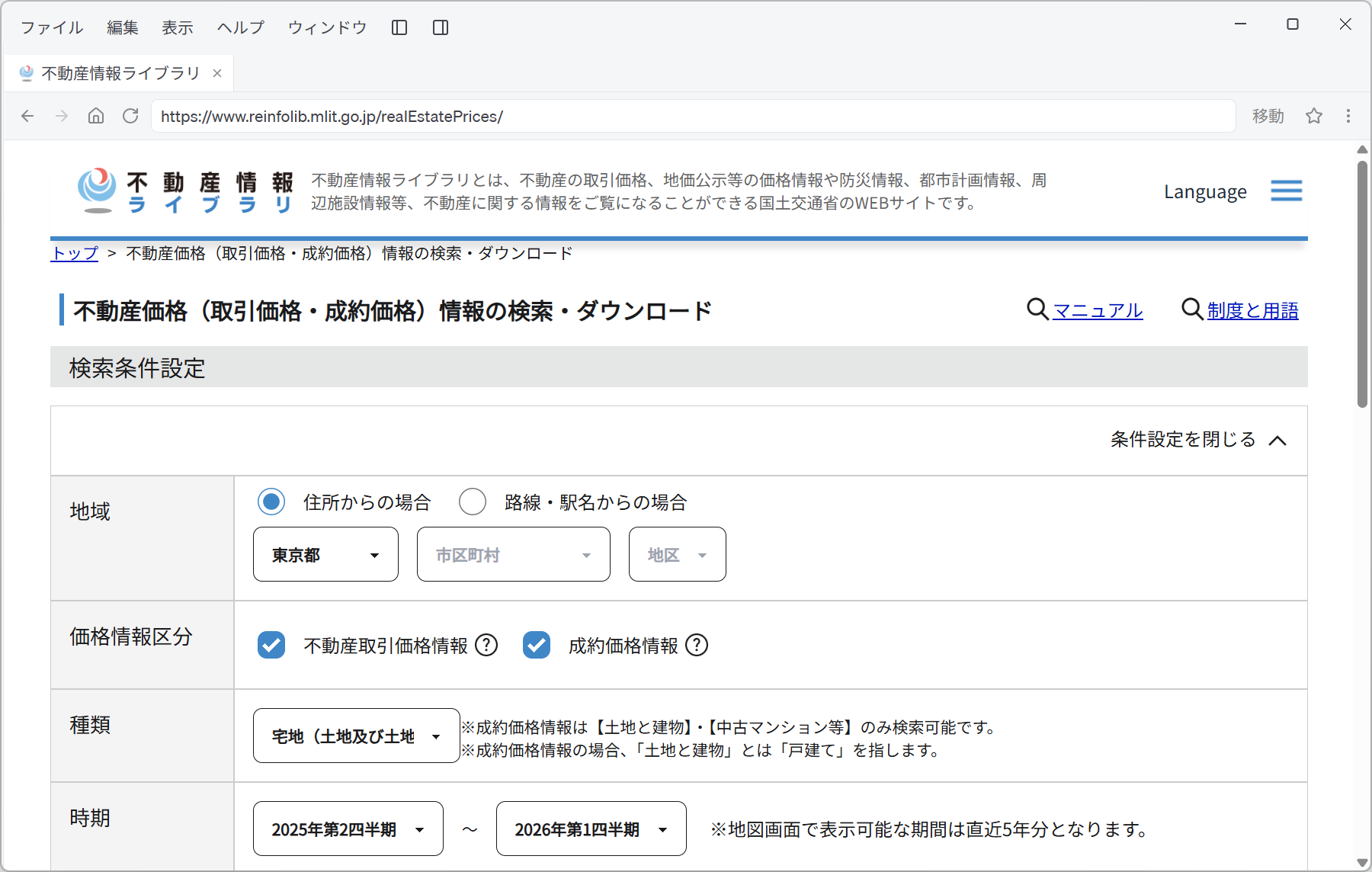
- Open Web Browser in the left navigation panel and go to the target page.
URL: https://www.reinfolib.mlit.go.jp/realEstatePrices/
Screenshot shown in the original Japanese.
- On this page you choose 「地域」 (area), 「価格情報区分」 (price information category), 「種類」 (type) and 「時期」 (period), run the search, and download the results as CSV. Repeating this by hand for every combination of 23 wards × 2 types is work in which a condition is easily mis-set or a download missed. We hand this repetition to the AI.
Instruct the AI
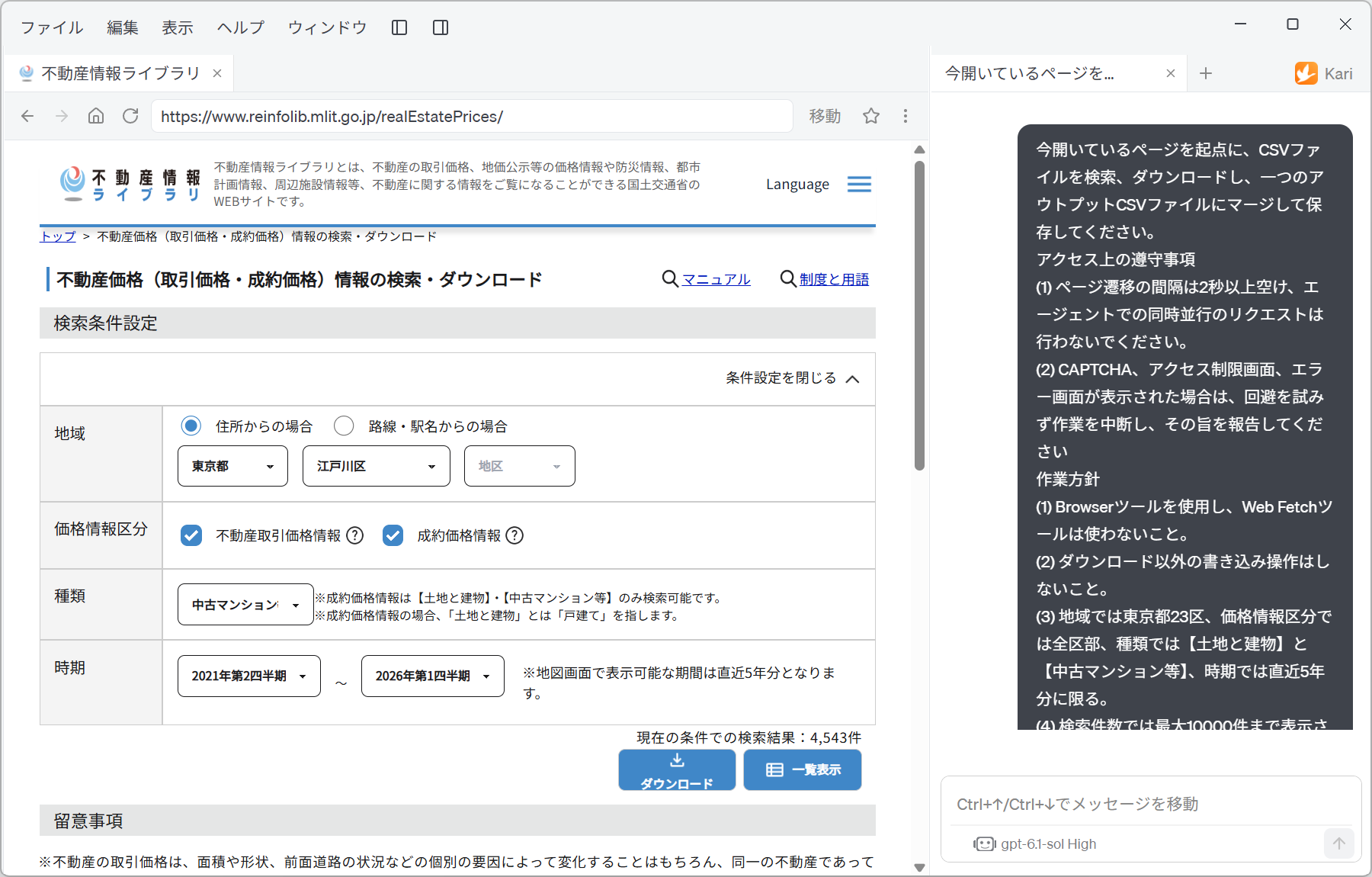
- Specify the search conditions — target area, price information category, type, period and so on — and instruct the AI as follows. The prompt below is an English rendering of the Japanese prompt shown in the screenshot; the site's labels, option names and the file name are quoted as they appear on the Japanese site.
Starting from the page that is currently open, search for and download the CSV files, merge them into a single output CSV file and save it.

Access rules to observe
(1) Leave at least two seconds between page transitions, and do not make concurrent requests from the agent.
(2) If a CAPTCHA, an access restriction screen, or an error screen appears, do not try to work around it — stop and report it.

Working approach
(1) Use the Browser tool; do not use the Web Fetch tool.
(2) Perform no write operations other than downloads.
(3) Limit the search to: 「地域」 (area) — Tokyo's 23 wards; 「価格情報区分」 (price information category) — all categories; 「種類」 (type) — 【土地と建物】 (land and building) and 【中古マンション等】 (second-hand condominiums); 「時期」 (period) — the most recent five years.
(4) The search shows at most 10000 results, so check every time that the results are not cut off.

Saving the file
(1) Save it in the current session folder under the file name 「不動産価格.csv」 (real estate prices).

Chat output: in addition to saving the file, output the following in the body of the chat reply, as bullet points plus tables
(1) A table of the search conditions retrieved. State clearly anything that could not be downloaded.
(2) The path and file size of the saved file.
(3) The source, stated clearly (Source: MLIT website, URL of the relevant page).
Screenshot shown in the original Japanese.
The way this instruction is put together has a few key points.
| Block of the instruction | What it is for |
|---|---|
| Access rules to observe | Spells out the interval and serial execution so that the other site is not put under load. Having the AI stop and report rather than work around a CAPTCHA or error screen prevents unintended workarounds. |
| Working approach | Limits the tool to Browser and then fixes the search conditions (23 wards, all categories, 2 types, last 5 years). Point (4) also addresses the 10,000-result display limit, so that the AI does not silently stop short when it hits the limit. |
| Saving the file | Has the AI merge the downloads, which come split by ward and by type, into one CSV. The analysis that follows can start from a single file. |
| Chat output | Asks for a table of the search conditions and a clear statement of anything that could not be retrieved. The human checking work is concentrated here. |
Spell out the range of operations you allow the AI, as in "Perform no write operations other than downloads". This avoids unintended write operations other than submitting the search form.
Check the AI's work in the chat session
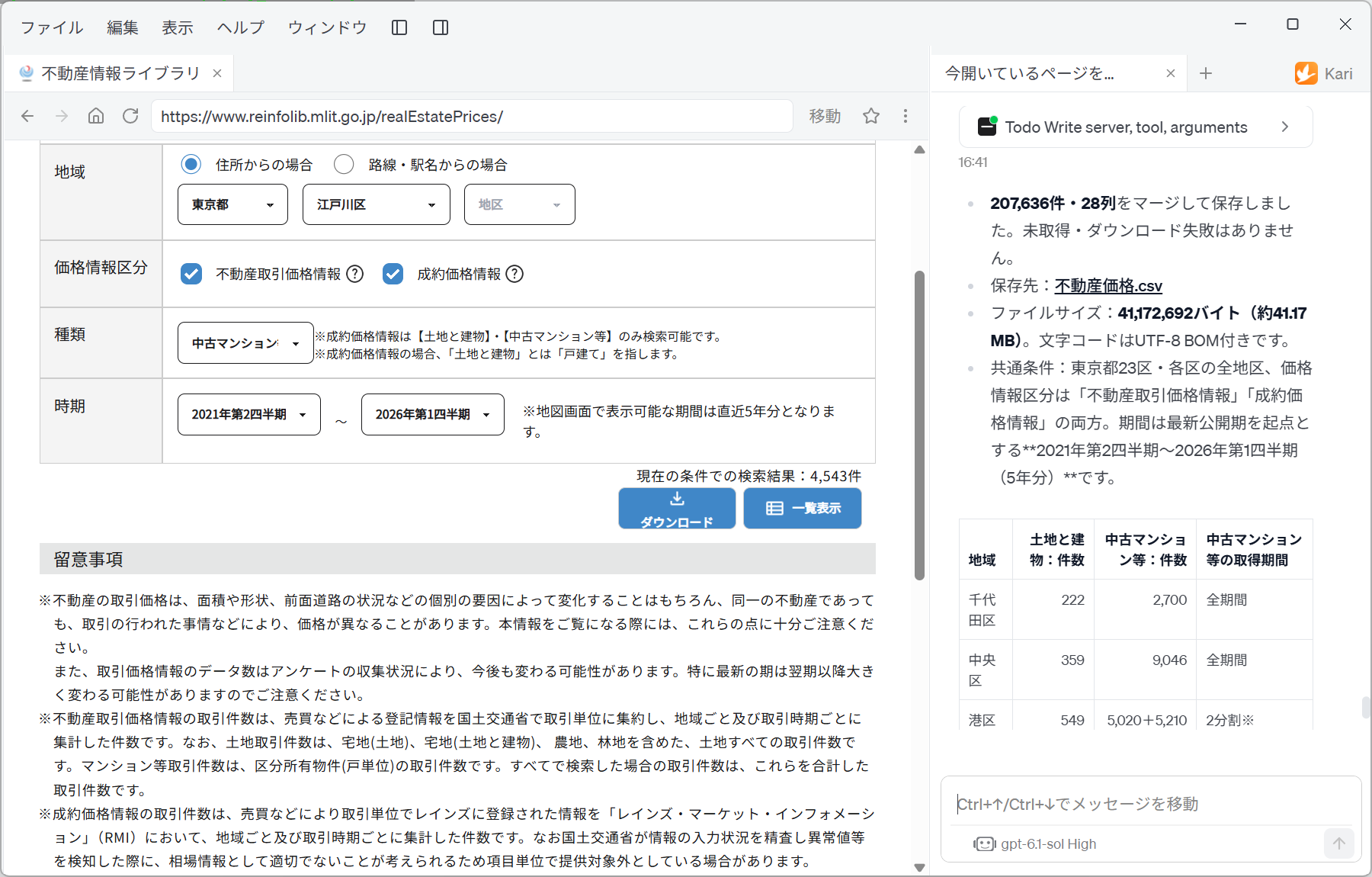
- The AI repeats the downloads, switching the search conditions ward by ward and type by type, and finally merges them into one CSV. While it works, the progress of the tool calls is shown in the session window.
Screenshot shown in the original Japanese.
In this example, the AI reported the following.
-
It merged and saved 207,636 records and 28 columns. Nothing was left unretrieved and no download failed.
-
The file was saved as
不動産価格.csv. -
The file size is 41,172,692 bytes (about 41.17 MB). The character encoding is UTF-8 (with BOM).
-
The common conditions were Tokyo's 23 wards with all districts of each ward, and both price information categories, 「不動産取引価格情報」 (real estate transaction price information) and 「成約価格情報」 (closed-sale price information). The period, counted back from the latest published period, is 2021 Q2 to 2026 Q1 (five years).
-
Next comes a table of the number of records retrieved per ward. With the columns 「土地と建物:件数」 (land and building: count), 「中古マンション等:件数」 (second-hand condominiums: count) and 「中古マンション等の取得期間」 (second-hand condominiums: retrieval period), you can trace, row by row, how many records of which type were retrieved for which ward.
| 地域 (area) | 土地と建物:件数 | 中古マンション等:件数 | 中古マンション等の取得期間 |
|---|---|---|---|
| 千代田区 (Chiyoda) | 222 | 2,700 | 全期間 (whole period) |
| 中央区 (Chuo) | 359 | 9,046 | 全期間 (whole period) |
| 港区 (Minato) | 549 | 5,020+5,210 | 2分割※ (split in two※) |
-
The row to note in this table is Minato Ward. Its second-hand condominium count is reported as 「5,020+5,210」 and its retrieval period as 「2分割」 (split in two). A single search would hit the 10,000-result display limit, so the AI split the period in two and retrieved it twice. This is where point "(4) The search shows at most 10000 results, so check every time that the results are not cut off" in the instruction took effect.
-
The browser on the left still shows the search form the AI was operating at that moment: 地域 (area) 「東京都/江戸川区」 (Tokyo / Edogawa Ward), both price information category boxes ticked, 種類 (type) 「中古マンション」 (second-hand condominium), 時期 (period) 「2021年第2四半期〜2026年第1四半期」 (2021 Q2 to 2026 Q1), and 「現在の条件での検索結果:4,543件」 (search results for the current conditions: 4,543). Besides the AI's report, you can corroborate it with the conditions and the count on the screen.
Check the downloaded CSV file's information
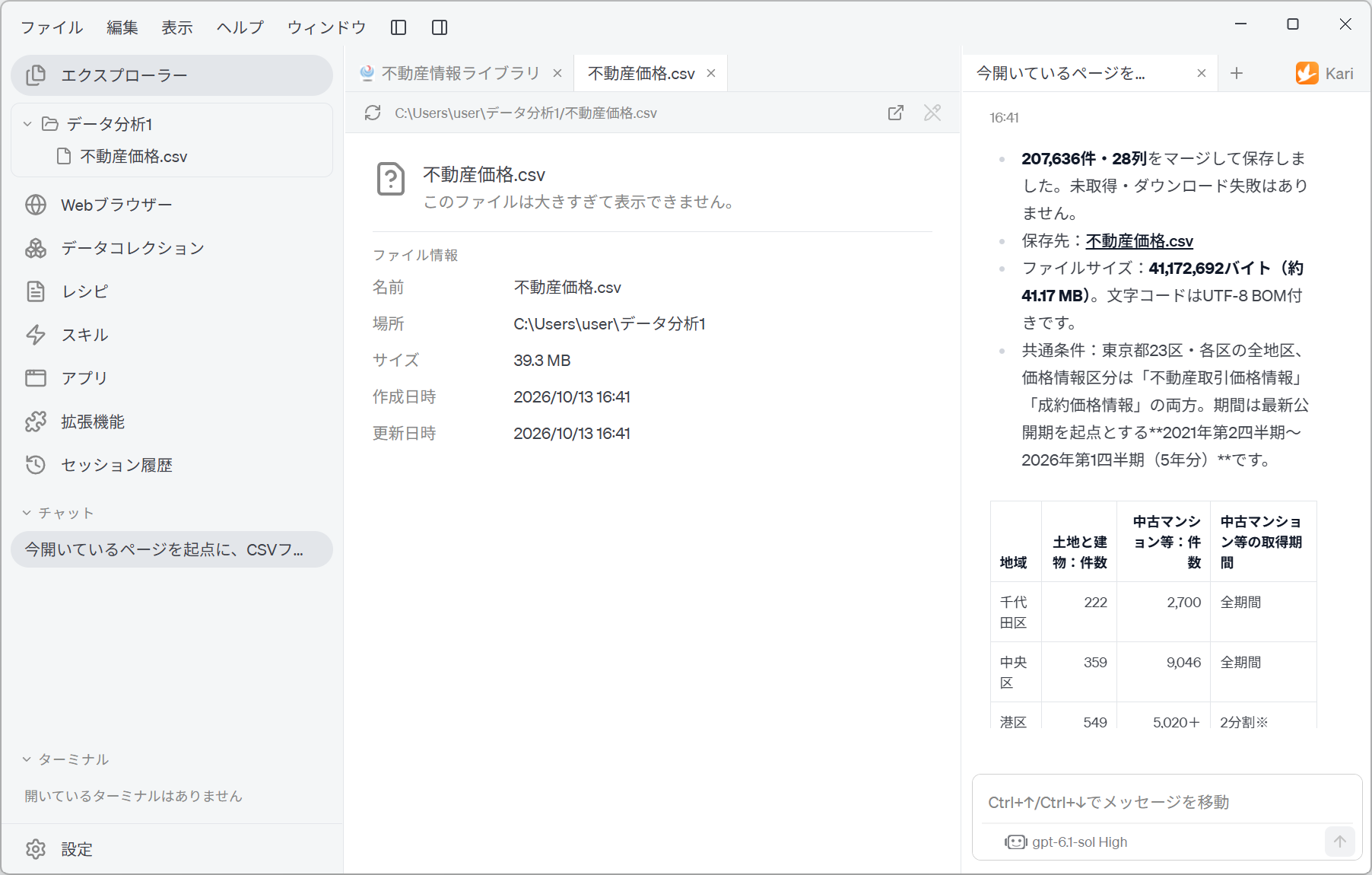
- Open Explorer in the left navigation panel and check the file that was actually saved. In this example, a single file,
不動産価格.csv, is saved directly under the session folder 「データ分析1」 (Data Analysis 1). As instructed, the 23 wards are merged into one file.
Screenshot shown in the original Japanese.
- Select the file and its file information is shown.
| Item | Shown |
|---|---|
| Name | 不動産価格.csv |
| Location | C:\Users\user\データ分析1 |
| Size | 39.3 MB |
| Created | 2026/10/13 16:41 |
| Modified | 2026/10/13 16:41 |
- The preview area shows "This file is too large to display." This is a limit of Kari's preview; there is nothing wrong with the file itself. In the next step, we load this file not through the preview but through a Data Collection and analyze it.
The AI's report says "41,172,692 bytes (about 41.17 MB)" and Explorer shows "39.3 MB", which at first glance looks like a discrepancy. This comes from a difference in how the unit is counted; it is the same size.
- 41,172,692 ÷ 1,000,000 ≒ 41.17 (counting 1 MB as 1,000,000 bytes)
- 41,172,692 ÷ 1,048,576 ≒ 39.3 (counting 1 MB as 1,048,576 bytes)
When you check the AI's report against what the screen shows, compare byte counts, not the converted MB figures.
Human-in-the-loop points
Do not leave everything to the AI. Check the following yourself.
-
Always check the conditions that hit the 10,000-result limit
When search results exceed 10,000, part of them is not shown on screen. In this example, Minato Ward's second-hand condominiums were retrieved in two parts, 「5,020+5,210」. Look at the 「取得期間」 (retrieval period) column of the report table, pick out the rows that are not 「全期間」 (whole period), and make sure that nothing was duplicated or dropped at the boundary of the split. Wards with many records (Minato, Setagaya, Ota and so on) need particular attention. -
Check the total against the parts
Confirm that the reported 207,636 records match the sum of the per-ward counts. If anything was dropped or counted twice during the merge, this is where you will notice. -
Data for the latest period changes afterwards
The target page's 「留意事項」 (notes) state that the number of transaction price records may continue to change depending on how questionnaire collection progresses, and that the latest period in particular may change significantly in subsequent periods. If your analysis includes the most recent quarter, record the date of retrieval and treat your conclusions as valid as of that date. -
Check the starting point of "the most recent five years"
"The most recent five years" is a relative condition. In this example it was interpreted as 2021 Q2 to 2026 Q1, counted back from the latest published period. Read the period the AI reported and confirm that it matches the period you intended. -
Check the character encoding
The CSV in this example is UTF-8 (with BOM). Opening it directly in Excel is fine, but when you pass it to other tools or scripts, the presence or absence of the BOM can change the name of the first column. -
Respect the other site's terms of use
Specifying the access interval and the number of concurrent requests is the responsibility of the person giving the instruction. Check the target site's terms of use androbots.txt, and judge whether secondary use of the retrieved data is permitted. -
State the source clearly
If you use the retrieved data in material or a report, state the source (MLIT website, Real Estate Information Library) and the date of retrieval.
The accuracy of the reading and the presentation of the output can vary with the LLM used. Check long lists against the original page.
References
The steps on this page use the following public system for illustration. Screenshots are reproduced as quotations with the source stated. The list of record counts that the AI output and the file it saved were generated by GotoAI as an example of Kari's operation; they were not created or published by MLIT.
- Material: Real Estate Information Library, 「不動産価格(取引価格・成約価格)情報の検索・ダウンロード」 (search and download of real estate price (transaction price and closed-sale price) information)
- Provider: Ministry of Land, Infrastructure, Transport and Tourism (MLIT)
- URL: https://www.reinfolib.mlit.go.jp/realEstatePrices/
- Accessed: October 13, 2026
- Terms of use: In accordance with that site's terms of use. Source: MLIT website (URL above).
- The external information quoted on this site is provided to illustrate examples of using Kari. This site does not guarantee the accuracy or currency of that information. Quoted sources may be changed or removed without notice.
- The AI output shown on this site was actually obtained in the stated verification environment. However, this site does not guarantee the accuracy or usefulness of that output. AI output varies with the LLM used, its settings, and from one run to the next.
- Before using AI output in your work, always check it against the original material and make your own judgement, at your own responsibility.
- Screenshots were taken with the version of Kari current at the time of writing. The display may differ in your version.
- Automatic downloads from websites must follow the target site's terms of use and
robots.txt. How you use the retrieved data is likewise your own judgement and responsibility. - This page deals with actual real estate transaction price data. If you use it for purchase or investment decisions, always check it against the original data.
- The organizations quoted have no affiliation with, and do not endorse, this site or Kari.