Checking the result
Copyright © 2026GotoAI Inc.Based on the goose project
Once a request is in, the administrator can watch the work in the Monitor Console, and the requester receives the finished diagnosis report by email.
Watch the desk work
Open http://localhost:28002 in a browser and the Monitor Console appears. For the screens, see Monitor Console, or Watching the desk work in Example 1: Subsidy diagnosis desk.
Accepted requests are listed as tickets, showing the ticket ID, when it was received, its state, when it was updated and how long it ran. The page refreshes itself every five seconds.
| State | What it means |
|---|---|
| Received | Accepted, waiting its turn |
| Processing | An agent is working it |
| Done | Finished, and the deliverable has been sent |
| Failed | Could not be completed |
This desk has Parallel Jobs set to 1, so if you file two requests in a row the second waits as Received until the first is finished.
Look inside a ticket
Click a ticket ID and everything recorded about that request appears.
| Item | What it shows |
|---|---|
| Request | The values the form accepted, with the form version and the channel they arrived by (web-portal) |
| Runs | Started, finished, outcome, number of steps |
| System prompt | The full text of the instructions the agent was given on that run |
| The full transcript | The request, the agent's replies, tool results and its thinking |
Following the transcript shows what the desk is doing. For this desk it runs roughly in this order.
load_skillloads 「企業業績診断スキル」compareinedinet-company-profilespulls the metrics for the target and its peers in one go- The metrics furthest from the peer median are picked out as the points to examine
export_filingon EDINET Util fetches the annual securities reports, and the relevant passages are read — management's analysis of financial position and results, business risks, and so onbuild_report.pylays the report out as a PDF and saves it tooutbox/
Expect something like 15 to 30 tool calls in all.
Receive the diagnosis report
When the work is done the ticket becomes Done and a delivery notification goes to the requester's address. This desk has email attachments on, so the PDF is attached to the message. It can also be fetched from the link to the download portal.
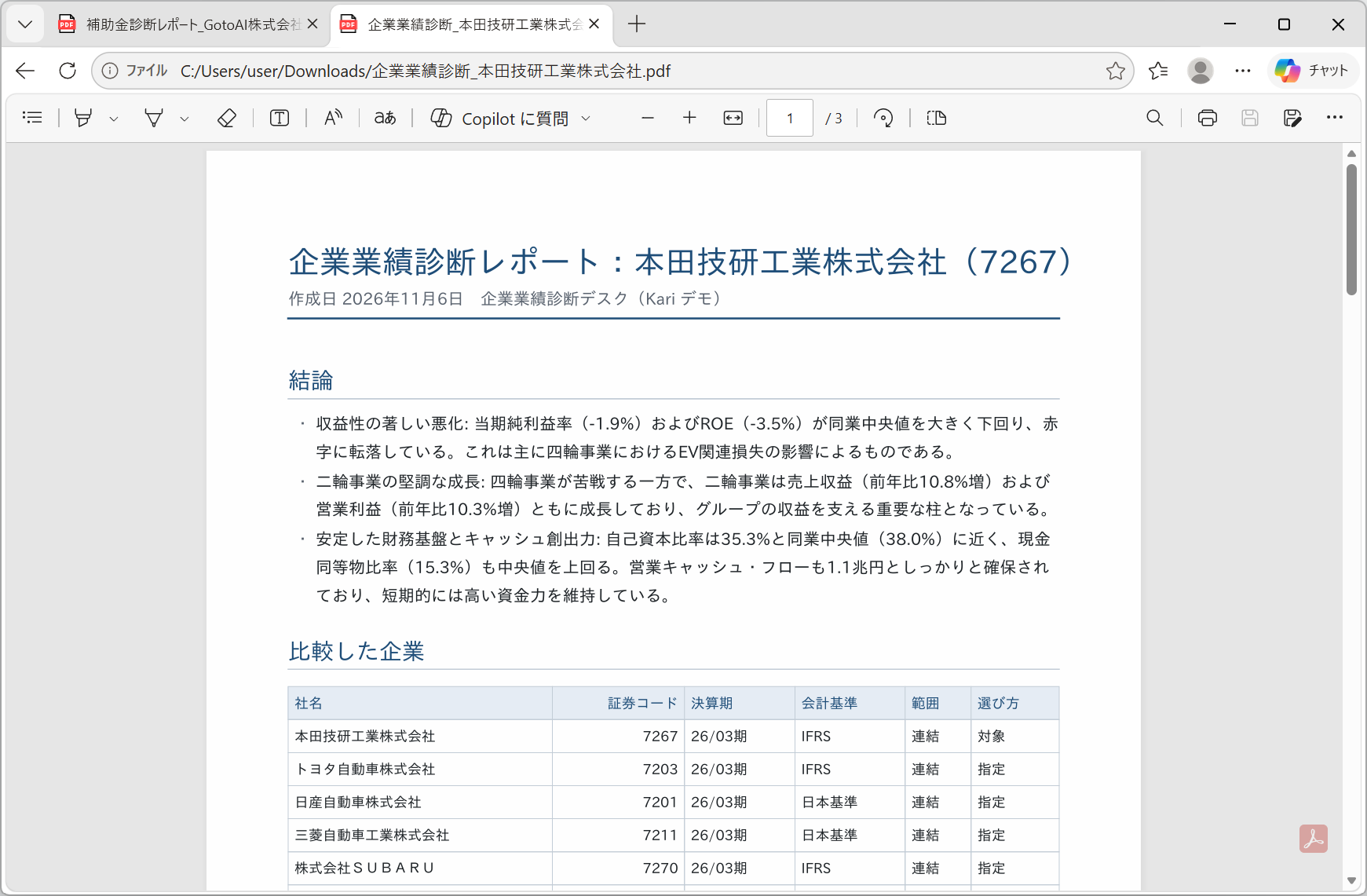
The file is named 企業業績診断_<company name>.pdf. The report is laid out as follows.
| Section | What it holds |
|---|---|
| 結論 — Conclusion | Two to four strengths and weaknesses, expressed as differences from the peers |
| 比較した企業 — Companies compared | The companies used in the comparison (name, securities code, fiscal year end, accounting standard, consolidated or parent-only, how each was chosen), with the reason for any company the desk picked itself or left out |
| 指標の比較 — Metric comparison | A table of the main metrics (the target, the peer median, the difference, the rank) |
| 論点ごとの分析 — Analysis point by point | The difference in the figures → the reason given in the annual securities report → what follows from it |
| 今後の注目点 — What to watch | Only what the figures and the filings support |
| データについて — About the data | The as-of date, differences in fiscal year end, accounting standard and consolidation basis, and the figures not held in the database |
| 出典・ご留意事項 — Sources and notices | The EDINET attribution and the statement that the data was processed, and that this is not investment advice |
The link to the download portal stops working 48 hours after delivery: the files are deleted and the link says so. A copy attached to an email is not covered by that retention.
What to check (the human-in-the-loop points)
A desk is a tool for carrying the work up to the point where a person decides. Check the following before using the report.
| What to check | Where to look |
|---|---|
| Whether the peers make sense | The "companies compared" table. Whether a company the desk picked itself is convincing as a competitor, and whether a group company or a business in a different line has crept in |
| Whether the comparison is like for like | The fiscal year end, accounting standard and consolidation basis in that same table. Where accounting standards are mixed, the operating margin is indicative only. Where fiscal years differ, each company is compared on its own latest period |
| Where the figures came from | The as-of date under "about the data". Where 「—(最新期の値なし)」 — no figure for the latest period — has been filled in from the text of a filing, whether the source is given |
| Whether the reasoning rests on the filings | In the analysis, whether statements taken from an annual securities report carry their source (the document ID and the section), and whether inference is written as inference |
The figures in the report are processed by GotoAI from filings published through EDINET. If you are going to rely on them for a decision that matters, check them against the original annual securities report. The diagnosis is also analysis, not investment advice. Investment decisions remain your own.
When something goes wrong
| Symptom | Where to look |
|---|---|
| A ticket comes out Failed | In the ticket detail, read the run's outcome and the end of the transcript. If an EDINET Util tool call is erroring, check that the API key is registered (Setting up the MCP server) |
| A request produces no ticket | Check that the desk has not stopped, and that the port is still 8002 |
| No verification code or report arrives | Use Send a Test in Setting up email to prove the sending account works |
| Fewer than five peers | This happens when the peer candidates run out. The reason is written into the report's "companies compared" |
The ticket detail keeps everything the desk thought and called at the time. It is usually where the fix becomes obvious. If it failed for want of information, look at the request form; if it lacked a tool, look at the MCP servers and skills.
After making a change, Re-run a failed ticket and you can see how the result changes for the same request. A re-run is processed like any other ticket, so once it is done the requester receives the delivery notification. If you do not want that, stop the ticket in the Monitor Console before the processing finishes.